
So, what does a small business ecommerce website actually cost? The short answer is it can run anywhere from $3,000 to over $50,000. It’s a wide range, I know. But the final number boils down to a key comparison: how complex your store needs to be, the platform you build it on, and whether you start with a template or go for a fully custom design. The implications of this choice affect not just your initial budget but your long-term operational efficiency.
For most small businesses, a professional online store is a major—but totally necessary—investment. An actionable insight here is to view this cost not as an expense, but as capital invested in your most important sales channel.
Understanding Your Ecommerce Investment
Think of building an online store like you would a physical one. You wouldn’t expect a small pop-up shop to have the same cost or benefits as a massive department store, right? The same logic applies here. Your investment is directly tied to your business’s size, your goals, and the kind of experience you want to give your customers.
A practical example is a startup using a simple, clean setup to get selling quickly without breaking the bank. But as that business grows, so do its needs. The implication is that you’ll eventually require more sophisticated features, tighter security, and integrations with other business software. That evolution naturally drives up the cost, but the benefit is a store that can handle increased volume and complexity.
Key Factors Driving the Price Tag
A few core components will shape your final budget. Understanding the differences between these options helps you make smarter decisions and put your money where it counts for the best return.
Here are the main cost drivers:
- Platform and Technology: This is the foundation of your store. Choices like Shopify, BigCommerce, or WooCommerce all have different pricing structures, benefits, and limitations. A key comparison is SaaS (like Shopify) versus open-source (like WooCommerce), which has major implications for ownership and long-term costs.
- Design and User Experience (UX): A basic template is the most affordable route. A custom-designed, conversion-focused layout, on the other hand, is a bigger investment but its primary benefit is a higher conversion rate, which can pay for itself many times over.
- Custom Features: Need something special? Things like product personalizers, subscription options, or advanced search filters all add to the development time and cost. The benefit of custom features is a unique competitive advantage.
- System Integrations: Connecting your store to inventory management, accounting software like QuickBooks, or your CRM adds another layer of complexity. The implication of not integrating is hours of manual data entry, while the benefit of doing it right is a streamlined, automated operation.
This visual gives a great breakdown of the typical investment levels for businesses at different stages, from a startup just getting its feet wet to a full-blown enterprise.
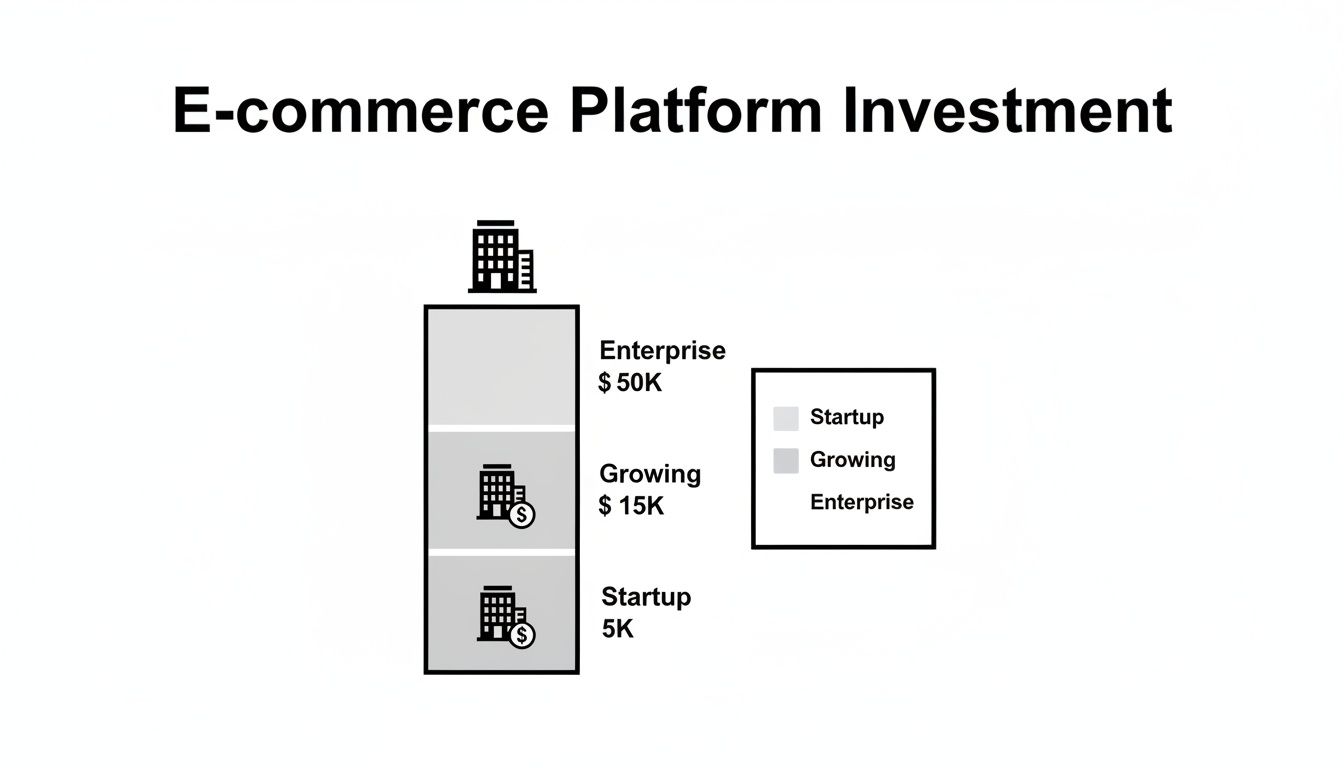
As you can see, the investment scales right alongside the business. Enterprise-level stores require a much larger capital outlay to handle their advanced needs, but the benefit is a platform that can support millions in revenue.
The pricing landscape for ecommerce is wide, influenced by platform choice and feature complexity. For startups, costs for a custom site typically range from $5,000 to $15,000, while large-scale enterprise solutions often exceed $50,000. Learn more about these development cost findings and try the free website design cost calculator.
To get a clearer picture of what you might expect to spend, we’ve broken down the typical costs by business size. This table provides a snapshot of both the initial setup investment and the ongoing monthly expenses you should anticipate.
Estimated Ecommerce Website Cost by Business Size
| Business Size | Approach | Initial Setup Cost | Ongoing Monthly Cost |
|---|---|---|---|
| Startup | DIY / Template | $1,000 – $5,000 | $50 – $300 |
| Small Business | Agency / Template | $5,000 – $15,000 | $300 – $1,000 |
| Growing Business | Agency / Semi-Custom | $15,000 – $50,000 | $1,000 – $5,000 |
| Enterprise | Agency / Full Custom | $50,000+ | $5,000+ |
These numbers are a great starting point for budgeting. Your final costs will, of course, depend on the specific features and level of customization your business needs to thrive.
Ultimately, it’s crucial to see your website as a strategic asset, not just a line-item expense. A well-built ecommerce site is your 24/7 salesperson—it generates revenue, builds your brand, and serves your customers around the clock. The initial cost is just the down payment on a powerful engine for your business’s growth.
Choosing Your Build: Three Core Ecommerce Models

Before you can nail down the cost of an ecommerce website, you have to answer a fundamental question: how are you actually going to build this thing? I find it helps to think of it like building a house. You’ve got three main paths you can take, and each one comes with a different price tag, timeline, and level of control. A key comparison of these models will highlight their distinct benefits and implications.
Your decision here is the single biggest factor that will shape your startup costs and your store’s future capabilities. Let’s walk through these three core models so you can make an informed choice for your business.
The DIY Platform: The Prefab Home
First up, you have the “Do-It-Yourself” platforms like Shopify or BigCommerce. This is the ecommerce version of buying a high-quality prefab home. The foundation is poured, the walls are up, and all the essential systems are already in place. Your job is to pick the paint colors and move your stuff in.
These platforms are built for speed and simplicity. The key benefit is getting a secure, reliable, and powerful foundation to build on without ever touching a single line of code. It’s a fantastic way to get your foot in the door, which is why so many startups begin here.
The biggest benefits are clear:
- Speed to Market: You can have a fully functional store up and running in a matter of days or weeks, not months. This is a huge practical advantage for testing a new product.
- Lower Initial Cost: Instead of a huge upfront investment, you’re looking at a predictable monthly subscription fee.
- Built-in Security and Hosting: The platform handles all the tech headaches—security, server maintenance, hosting—so you don’t have to.
Of course, the implication of this convenience is a trade-off. You’re living in their ecosystem, which means customization has limits and you’ll pay transaction fees on top of what your payment processor charges. For a closer look at the players, check out our guide on the best ecommerce platform for small businesses.
The Template-Based Build: The Architect’s Blueprint
The next approach is using a flexible, open-source platform like WooCommerce (a WordPress plugin) and starting with a pre-designed theme. This is like buying a set of an architect’s blueprints. You get a proven, solid structure, but the benefit is the freedom to move walls, choose all your own finishes, and add custom extensions.
This model strikes a great balance between control and cost. It does require more technical know-how (or a developer’s help), but it gives you far more freedom than a DIY platform. A practical example is a business wanting a unique blog design to drive content marketing, which is much easier on WordPress.
This is the perfect middle ground for businesses that have hit the ceiling of a simple DIY store but aren’t quite ready to drop five or six figures on a fully custom build. It lets you grow on your own terms.
Here’s a comparison of the benefits for you:
- Greater Customization: You can dig into the code, add thousands of different plugins, and fine-tune the customer experience to perfectly match your brand.
- Ownership and Control: You own everything—your data, your design files, your website. The implication is you’re not locked into one company’s system and can move to a new web host anytime.
- No Platform Transaction Fees: While you’ll still have standard payment processor fees, platforms like WooCommerce don’t take an extra cut of your sales, a direct financial benefit.
The main implication to remember here is that the buck stops with you. You’re in charge of finding your own hosting, keeping the site secure, and managing all the software updates, which can definitely add to your workload.
The Fully Custom Build: The Dream Home
Finally, we have the fully small business website custom build. This is the equivalent of hiring an architect and a construction crew to build your dream home from scratch, based on a vision that’s entirely yours. Every single detail, from the foundation to the floor plan, is designed and built just for your business.
The primary benefit is unlimited potential, but the implication is that it’s also the biggest investment of time and money. This route is typically for established businesses with complex needs—a practical example is a site with a unique product configurator, specialized B2B ordering portals, or deep integrations that off-the-shelf software just can’t handle.
A custom build makes sense when your website is your competitive advantage. The upfront cost of an ecommerce website built this way is high, but for the right business, the ROI from a solution perfectly tailored to your operations can be massive.
Beyond the Build: Uncovering Ongoing and Hidden Costs
The initial quote for building your ecommerce website? That’s just the down payment. Launching your store is like buying a new car—the sticker price gets you the keys, but you still need to budget for gas, insurance, and tune-ups.
Your ecommerce site is a living, breathing part of your business. The actionable insight here is to plan for these recurring costs from day one. They’re what keep your digital doors open, your customer data secure, and your checkout working 24/7. Ignoring them has serious negative implications for your business’s sustainability.
The Essential Operating Expenses
Think of these as the utilities for your online storefront. They are the non-negotiable costs that keep your website live, functional, and trustworthy. Skimping on these has clear implications: downtime, security breaches, or—worst of all—lost sales.
These core operational costs are the bare minimum:
- Web Hosting: This is the plot of digital land where your website lives. If you’re using a platform like WooCommerce, you’ll need to buy your own hosting, which can run anywhere from $10 to $100+ per month, depending on your traffic.
- Domain Name: This is your store’s address on the internet (like
yourcoolbrand.com). It’s a small but vital annual fee, typically costing between $15 and $30 per year. - SSL Certificate: This powers the padlock icon in the browser, encrypting data. Many hosts include a basic one, but premium SSL certificates offer the benefit of enhanced security for an annual fee.
- Email Hosting: To look professional, you need an email like
support@yourcoolbrand.com. This usually costs a few dollars per user, per month.
Once these fundamentals are covered, your costs will start to scale with your store’s features and your marketing ambitions.
The Transactional and Growth Costs
Beyond the basics, you’ll run into expenses tied directly to your sales volume. The big one here is payment processing. Every time a customer clicks “buy,” a payment gateway like Stripe or PayPal takes a small slice of the transaction. The implication is that these fees directly eat into your profit margins.
Many companies balance initial setup costs with ongoing annual expenses, such as hosting, domain registration, SSL certificates (roughly $50 annually), and software licenses, which can total $500 to $5,000 per year. Transaction fees average between 2-3% plus fixed fees, varying by payment provider. Discover more insights about these operational costs for online selling.
This is where the cost of an ecommerce website becomes a moving target. The more you sell, the more you’ll pay in transaction fees—but the clear benefit is that your revenue is growing, making this a good problem to have.
The Often-Overlooked “Hidden” Fees
Finally, we have the costs that new store owners almost always forget to budget for. A practical example is the monthly fee for a subscription app or a premium shipping calculator. These are the tools and services that add powerful features or get people to visit your store.
Keep these potential line items on your radar for actionable budgeting:
- Premium Plugins & Apps: Need a subscription feature, a loyalty program, or advanced product filters? That functionality often comes from third-party apps with their own monthly or annual fees, ranging from $20 to $200+ per month.
- Software Licenses: Want to connect your store to accounting software like QuickBooks or an email platform like Mailchimp? Those services have their own subscription costs.
- Marketing & SEO: A beautiful website is useless if no one can find it. A realistic budget for SEO, content creation, or paid ads is not optional; it’s essential for growth.
- Maintenance & Updates: An actionable insight is to set aside a budget for a developer to handle regular updates and tech support. This prevents small issues from turning into costly, site-down emergencies.
By mapping out all these ongoing costs from the start, you can build a realistic budget that supports your business not just on launch day, but for years to come.
Deconstructing the Development Quote: A Line-by-Line Breakdown
When you get a quote for a new ecommerce site, it can look like a foreign language. But understanding these line items is the only way to know where your money is actually going. Think of it like an itemized bill from a mechanic—you want to see the cost for parts, labor, and diagnostics. An ecommerce quote does the same thing.
Let’s walk through the major items you’ll see on almost every proposal.
UI/UX Design: The Blueprint for Your Store
Before anyone writes a single line of code, your store needs a blueprint. This is the User Interface (UI) and User Experience (UX) design phase. UI covers the visuals—colors, fonts, and layout. UX is the strategic thinking behind it, making sure the path from browsing to buying is smooth and intuitive. The primary benefit of strong UX is a higher conversion rate.
The difference in cost here is significant. A basic design might just tweak a pre-made template. A full UI/UX process involves wireframes and user testing to build a custom experience engineered to convert. The implication of skipping this is a site that looks nice but doesn’t sell effectively.
Design isn’t just about aesthetics; it’s about making it dead simple for customers to find what they need and check out. A 1-second delay in page load time can cause a 7% drop in conversions. Good design is also fast design.
Custom Feature Development: Building Your Unique Edge
This is almost always the biggest and most varied cost on the invoice. Every ecommerce site has the basics: a product catalog, a shopping cart, and a checkout page. Custom development builds the unique tools that make your business stand out.
Practical examples of custom features include:
- Product Personalizers: Tools that let shoppers add names, upload images, or pick custom colors.
- Subscription & Recurring Billing: Systems that manage repeat orders automatically for things like monthly boxes or memberships.
- Advanced Search & Filtering: Smart search tools that help customers sift through a huge catalog to find exactly what they want, fast.
Each custom feature is its own mini-project. A key comparison: a simple “subscribe and save” option is far less expensive to build than a “build-your-own-box” feature with tons of different pricing and shipping rules. The benefit of these features is creating a unique value proposition.
Third-Party System Integrations: Connecting the Dots
Your ecommerce site doesn’t live on an island. It has to talk to all the other software that runs your business. Integrations are the digital bridges that let these systems share data automatically. The implication of poor integration is a manual, error-prone nightmare.
Common integrations include connecting your store to:
- Customer Relationship Management (CRM): Syncing customer info with tools like HubSpot or Salesforce.
- Enterprise Resource Planning (ERP): Linking up with your inventory, supply chain, and order management software.
- Accounting Software: Pushing sales data directly into platforms like QuickBooks.
- Email Marketing Platforms: Connecting with services like Mailchimp or Klaviyo for automated campaigns.
Simple integrations using pre-built connectors are affordable. The difference is, if you need to connect to a custom internal system, it often requires building a custom API from scratch, which significantly drives up the cost. Getting these connections right is a crucial part of the web development for small businesses process.
Before we get into the final polish, let’s look at a more detailed breakdown of how different features can impact your budget.
Detailed Cost Drivers in Ecommerce Development
The table below provides a key comparison of how specific features contribute to the overall development cost, from simple implementations to more complex, custom-built solutions.
| Feature/Service | Typical Cost Range (Low-End) | Typical Cost Range (High-End) | Key Considerations |
|---|---|---|---|
| Basic Product Catalog | $2,000 – $5,000 | $5,000 – $12,000 | High-end costs include complex product variations, filters, and high-resolution media management. |
| Shopping Cart/Checkout | $3,000 – $7,000 | $8,000 – $20,000+ | Custom checkout flows, tax calculations, and integrations with multiple payment gateways increase complexity. |
| Custom Product Builder | $5,000 – $10,000 | $25,000+ | Depends on the number of customizable options, real-time preview generation, and dynamic pricing rules. |
| Subscription Engine | $4,000 – $8,000 | $15,000 – $30,000 | Simple recurring payments vs. complex “build-a-box” models with variable frequencies and customer portals. |
| Third-Party Integrations | $1,500 – $4,000 (per system) | $7,000 – $15,000+ (per system) | Costs rise significantly when a custom API is needed versus using a pre-built connector. |
| Data Migration | $2,000 – $6,000 | $10,000 – $25,000+ | Moving customer, product, and order data from an old system. Complexity depends on data volume and cleanliness. |
As you can see, the term “feature” can mean very different things. A “subscription” tool can be a simple plugin or a deeply integrated custom system, and the price will reflect that reality.
Quality Assurance Testing: The Final Polish
Before your website ever sees the light of day, it needs to be put through its paces. The Quality Assurance (QA) phase is a non-negotiable step where testers act like your pickiest customers, intentionally trying to break everything.
The benefit of QA is catching bugs, usability problems, and security holes before your actual customers find them. The cost is directly tied to the project’s size. The implication of skipping or rushing QA is a buggy launch that can wreck your brand’s reputation and cost you far more in lost sales than you would have spent on proper testing.
All these factors add up. A basic ecommerce website with standard features often lands in the $25,000 to $90,000 range and takes about 8 to 16 weeks to build. For more complex stores with custom logic and tricky integrations, you could be looking at $80,000 to $250,000 or more, with timelines pushing past 28 weeks. For a deeper analysis of these numbers, you can check out more insights about development costs in the US.
Putting It All Together: Sample Budget Scenarios
All the line items and cost drivers are helpful, but nothing makes the numbers click quite like seeing them in action. Let’s walk through a few practical examples to connect the dots between platforms, features, and those sneaky ongoing fees.
These are actionable blueprints to help you map out your own financial game plan. You’ll notice pretty quickly that the initial “build” is just one piece of a much bigger puzzle that includes platform fees, marketing, and the tools you need to actually run the business.
Scenario 1: The Solo Artisan Launch
First up is “Clay & Kiln,” a potter ready to take her handmade ceramics from a passion project to a real business. For her, the key benefits she needs are getting online quickly, keeping costs low, and having a site that’s dead simple to manage. She needs a clean, professional storefront but complex features can wait.
Her strategy? A DIY platform like Shopify on a basic plan. This move keeps upfront costs near zero and makes monthly expenses predictable. The implication is she can pour her energy into what she does best: making beautiful pottery and building an audience.
For a new artisan, the goal isn’t to build a feature-packed digital empire overnight. It’s about creating a beautiful, trustworthy online storefront that validates the business model and starts generating revenue with minimal financial risk.
Here’s what a first-year budget could look like:
- Platform: Shopify Basic Plan ($348/year)
- Initial Setup: Premium theme purchase and setup ($500)
- Essential Apps: Simple photo gallery and email pop-up ($240/year)
- Launch Marketing: Social media ads and collaborations ($1,500)
- Transaction Fees: Estimated at 2.9% + 30¢ per sale (Variable)
- Total First-Year Investment (excluding transaction fees): $2,588
Scenario 2: The Growing Retail Brand
Next, meet “Urban Threads,” a local boutique with a loyal following. They’re ready to expand online but need a site that can handle a larger catalog and integrate with their in-store POS system for unified inventory—a key benefit for their operations. They also want a more custom feel than a simple template can offer.
They’ve decided to work with an agency to build a semi-custom site on WooCommerce. This gives them the design flexibility and ownership they crave without the hefty price tag of a fully custom project. Their budget reflects a bigger investment in design and integration to ensure a seamless experience for their customers.
- Platform: WooCommerce (self-hosted)
- Initial Setup: Agency design and development ($12,000)
- Hosting: Managed WordPress hosting plan ($600/year)
- Essential Plugins: POS integration, advanced shipping, and SEO tools ($800/year)
- Launch Marketing: Email marketing campaigns and local SEO ($4,000)
- Total First-Year Investment: $17,400
Scenario 3: The B2B Wholesale Portal
Finally, a practical example of a complex build: “Component Solutions,” an established B2B supplier. Their goal is a secure, password-protected portal for wholesale clients. For them, key features and benefits are everything: tiered pricing, quick re-ordering, and a rock-solid integration with their ERP system for live inventory data.
This is a job for a custom development project. The high initial cost is a strategic investment. The implication of this investment is massive operational efficiencies and improved customer self-service that will deliver ROI for years.
- Platform: Custom Build (likely on a platform like BigCommerce Enterprise)
- Initial Setup: Agency development with custom ERP integration ($45,000)
- Platform & Hosting: Enterprise-level plan ($6,000/year)
- Ongoing Maintenance: Retainer for support and updates ($5,000/year)
- Client Onboarding: Training and materials for existing clients ($2,000)
- Total First-Year Investment: $58,000
How to Maximize Your Ecommerce Investment
One of the biggest mistakes is viewing your ecommerce website as a one-time expense. It’s not. A key actionable insight is to treat it as a strategic investment in your most powerful revenue engine. To get the best possible return, the focus has to be on long-term value, not just short-term savings.
This shift in mindset means looking past the initial price tag and honing in on performance. The implication is that your website’s success isn’t defined by its cost, but by the revenue it generates. That all starts with a clear understanding of your key performance indicators (KPIs).
Turning Metrics Into Momentum
Tracking the right data is the first step toward making your investment work harder for you. The actionable insight is to focus on numbers that directly impact your bottom line—these are the vital signs of your online store’s health.
Key metrics you absolutely must monitor include:
- Conversion Rate: The percentage of visitors who make a purchase. The benefit of even tiny improvements here is huge gains in revenue.
- Average Order Value (AOV): How much a typical customer spends. Nudging this number up directly boosts your income.
- Customer Lifetime Value (CLV): The total profit you can expect from a single customer over time. A high CLV is the hallmark of a healthy, sustainable company.
Keeping a close eye on these KPIs will show you exactly where your site is winning and where it’s falling short. A practical example: a low conversion rate might point to friction in your checkout process, giving you a clear target for improvement.
Actionable Strategies for Higher ROI
Once you know your numbers, you can start putting targeted strategies in place to improve them. These are the actions that turn data-driven insights into real-world results, ensuring your initial investment continues to pay you back.
Your website is your 24/7 salesperson. Optimizing its performance is like giving that salesperson better training and tools. The goal isn’t just to attract visitors but to guide them seamlessly from browsing to buying.
Start with these high-impact, actionable tactics:
- Optimize Your Checkout Process: Cut down on friction by getting rid of unnecessary steps, offering a guest checkout option, and providing multiple ways to pay. A clunky checkout is the number one killer of sales.
- Implement Smart Email Marketing: Use automated email campaigns to bring back shoppers who abandoned their carts, welcome new subscribers with an offer, and re-engage customers. Email marketing consistently delivers one of the highest ROIs.
- Improve Site Speed and Mobile Experience: A slow or awkward mobile site will destroy your conversions. People have no patience for it. Make sure your site loads in a snap and is a breeze to navigate on any device. For more on this, check out our website design tips for small business to create a much better user experience.
Got Questions? We’ve Got Answers
Building an online store is a big step, and it’s natural to have questions. Here are some straight answers to the things business owners ask us most often.
How Long Does It Take to Build an Ecommerce Website?
This really boils down to a key difference: complexity. For a simple shop using a pre-built theme on a platform like Shopify, you could be up and running in as little as 2 to 4 weeks.
If you’re looking for a semi-custom build with more unique branding, it usually takes between 6 to 12 weeks. For a fully custom ecommerce machine with complex features and integrations, the implication is a much longer timeline of 4 months or more.
Can I Really Build an Ecommerce Site for Free?
Honestly? No. While you’ll see platforms advertising “free” plans, you can’t run a serious business on one. The implication of “free” is severe limitations: you can’t use your own domain name (like yourbrand.com), and most importantly, they can’t actually process payments.
Think of “free” plans as a marketing hook. To actually sell products and build a brand people trust, the benefit of a paid plan is essential. You’ll need to invest in a paid plan, a domain, and payment processing fees at the very least.
What’s a Realistic Budget for a Small Business?
For a professionally built ecommerce site designed to grow with you, a realistic starting budget is between $3,000 and $15,000. This range typically gets you a sharp, well-designed store on a flexible platform like WooCommerce, complete with all the essential features and integrations.
The key benefit of this upfront investment is a solid foundation you can build on for years. It helps you avoid the classic pitfall of starting too small, only to face a costly and frustrating rebuild down the road. The true cost of an ecommerce website isn’t just the initial price tag—it’s the long-term value and benefits it brings to your business.
Ready to build an online store that actually drives results? At Small Business Website Design, we create beautiful, high-performing ecommerce websites with transparent, fixed-price packages. We handle everything from conversion-focused design to the technical setup, so you can start selling faster. Learn more about our ecommerce design services.